ComposeNote
q# Jetpack Compose Notes
A modern UI framework for Android/multiple platforms.

Basics
Section titled “Basics”MainActivity Base Code
Section titled “MainActivity Base Code”class MainActivity : ComponentActivity() { override fun onCreate(savedInstanceState: Bundle?) { super.onCreate(savedInstanceState) enableEdgeToEdge() setContent { /* composable function goes here... */ } }}Units in Compose
Section titled “Units in Compose”sp (Scalable Pixels)
Section titled “sp (Scalable Pixels)”- Matches the user font preference
- For Text
dp (Density-independent Pixels)
Section titled “dp (Density-independent Pixels)”- Matches the user screen pixel (1dp = 1px on baseline)
- For Non-Text
Color in Compose
Section titled “Color in Compose”Using predefined colors
Section titled “Using predefined colors”color = Color.BlueUsing HEX code
Section titled “Using HEX code”color = Color(0xFF[hex-code])Get Device Configuration
Section titled “Get Device Configuration”Get screen width
Section titled “Get screen width”val configuration = LocalConfiguration.currentval screenWidthDp = configuration.screenWidthDpViewModel
Section titled “ViewModel”
Dependencies
Section titled “Dependencies”implementation("androidx.lifecycle:lifecycle-viewmodel-compose:2.6.0")ℹ️ You can use
ViewModelwithout dependencies, but get limited lifetime (the ViewModel will be destroyed every time the composable where it’s declared is recomposed or destroyed). So you have to place the viewModel atMainActivitywhere it won’t be destroyed or recomposed during runtime.
⚠️ Installing the dependencies will extend the lifetime of the viewModel
Add a class that inherits the ViewModel:
class userAuth : ViewModel() {    var starterScreen = mutableStateOf("signin")
    fun changeStarterScreen(screen: String) {        starterScreen.value = screen    }}
Call it in composable function
Section titled “Call it in composable function”@Composablefun Main(viewModel: userAuth = viewModel()) {
}Or create a value
Section titled “Or create a value”val viewModel = userAuth()ViewModel Factory
Section titled “ViewModel Factory”Use ViewModel Factory when you need to pass a value into a ViewModel.
Example: passing context to PlayerModel via viewmodel factory
class PlayerViewModelFactory(private val context: Context) : ViewModelProvider.Factory { override fun <T : ViewModel> create(modelClass: Class<T>): T { if (modelClass.isAssignableFrom(PlayerModel::class.java)) { @Suppress("UNCHECKED_CAST") return PlayerModel(context) as T } throw IllegalArgumentException("Unknown ViewModel class") }}ViewModel Without Plugin
Section titled “ViewModel Without Plugin”Using remember
Section titled “Using remember”val viewModel = remember { MyViewModel() }Create in MainActivity
Section titled “Create in MainActivity”val viewModel: MyViewModel by viewModels()State Management
Section titled “State Management”Using by keyword
Section titled “Using by keyword”To use the by keyword in compose, import:
import androidx.compose.runtime.getValueimport androidx.compose.runtime.setValueManual Recompose
Section titled “Manual Recompose”var count by remember { mutableStateOf(0) }key(count){ // recompose when the var count change}snapshotFlow
Section titled “snapshotFlow”Kind of like LaunchedEffect but allows use in non-composable functions
snapshotFlow { searchQuery } .filter { it.length > 2 } // Only emit if query is longer than 2 characters .debounce(500) // Wait 500ms after last change .collect { query -> println("Search query: $query") // Example: Trigger a network search }Kotlin Flow
Section titled “Kotlin Flow”Hot Flow vs Cold Flow
Section titled “Hot Flow vs Cold Flow”| Type | Description | Example |
|---|---|---|
| Cold Flow | Starts emitting only when collected, each collector gets its own stream | flow { }, flowOf() |
| Hot Flow | Emits regardless of collectors, shared among all collectors | StateFlow, SharedFlow |
Cold Flow
Section titled “Cold Flow”Created using flow { } builder. Each collector triggers a new execution.
fun fetchData(): Flow<Int> = flow {    for (i in 1..5) {        delay(1000)        emit(i)    }}
// Collect in composableLaunchedEffect(Unit) {    fetchData().collect { value ->        println("Received: $value")    }}
Flow Operators
Section titled “Flow Operators”flow .map { it * 2 } // Transform values .filter { it > 10 } // Filter values .debounce(300) // Wait for pause in emissions .distinctUntilChanged() // Skip consecutive duplicates .catch { e -> emit(default) } // Handle errors .onEach { log(it) } // Side effects .collect { /* use value */ }Convert Flow to StateFlow
Section titled “Convert Flow to StateFlow”val stateFlow = flow.stateIn( scope = viewModelScope, started = SharingStarted.WhileSubscribed(5000), initialValue = emptyList())SharingStarted Options
Section titled “SharingStarted Options”| Option | Description |
|---|---|
Eagerly | Start immediately, never stop |
Lazily | Start on first collector, never stop |
WhileSubscribed(ms) | Start on first collector, stop after last collector + timeout |
StateFlow
Section titled “StateFlow”A hot flow that holds a single value and emits updates to collectors. Always has an initial value.
Basic Usage
Section titled “Basic Usage”class MyViewModel : ViewModel() { private val _uiState = MutableStateFlow("Initial") val uiState: StateFlow<String> = _uiState.asStateFlow()
fun updateState(newValue: String) { _uiState.value = newValue }}Collect StateFlow in Composable
Section titled “Collect StateFlow in Composable”@Composablefun MyScreen(viewModel: MyViewModel = viewModel()) { val uiState by viewModel.uiState.collectAsState()
Text(text = uiState)}StateFlow vs LiveData
Section titled “StateFlow vs LiveData”| StateFlow | LiveData |
|---|---|
| Requires initial value | Can be null initially |
| Kotlin coroutines based | Lifecycle-aware by default |
collectAsState() in Compose | observeAsState() in Compose |
StateFlow vs SharedFlow
Section titled “StateFlow vs SharedFlow”| StateFlow | SharedFlow |
|---|---|
| Always has current value | No initial value required |
.value to read current | No .value property |
| Conflates (skips intermediate) | Configurable buffer/replay |
| Best for UI state | Best for events/actions |
SharedFlow
Section titled “SharedFlow”A hot flow that can emit multiple values and has no initial value. Supports replay and buffer.
Basic Usage
Section titled “Basic Usage”class MyViewModel : ViewModel() { private val _events = MutableSharedFlow<String>() val events: SharedFlow<String> = _events.asSharedFlow()
fun sendEvent(event: String) { viewModelScope.launch { _events.emit(event) } }}SharedFlow with Replay
Section titled “SharedFlow with Replay”// Replay last 3 values to new collectorsprivate val _events = MutableSharedFlow<String>(replay = 3)Collect SharedFlow in Composable
Section titled “Collect SharedFlow in Composable”@Composablefun MyScreen(viewModel: MyViewModel = viewModel()) { LaunchedEffect(Unit) { viewModel.events.collect { event -> // Handle one-time events (e.g., show snackbar, navigate) println("Event received: $event") } }}When to Use SharedFlow
Section titled “When to Use SharedFlow”- One-time events (navigation, snackbar, toast)
- Events that should not be replayed on configuration change
- Broadcasting to multiple collectors
Components
Section titled “Components”AlertDialog
Section titled “AlertDialog”
AlertDialog( icon = {/* icon */}, title = {/* title text */}, text = {/* content */}, onDismissRequest = {/* function when try to dismiss */}, confirmButton = {/* button */}, dismissButton = {/* button */})Bottom Bar
Section titled “Bottom Bar”
To create a BottomBar, use Scaffold:
Scaffold(modifier = Modifier.fillMaxSize(), bottomBar = { NavigationBar { // NavigationBarItem in here ... }})💡 Suggestion: Create a list for storing nav items data then iterate in
NavigationBar
NavigationBarItem
Section titled “NavigationBarItem”NavigationBarItem( selected = currentScreen == index, onClick = { currentScreen = index nav.navigate(item.title) }, label = { Text(item.title) }, icon = { BadgedBox(badge = { // Badge }) { Icon( imageVector = if (currentScreen == index) item.selectedIcon else item.unselectedIcon, contentDescription = "image" ) } })

Badge(content = { Text("12") })BoxWithConstraints
Section titled “BoxWithConstraints”Provides access to constraints inside the composable scope.
BoxWithConstraints { Image( painter = painterResource(R.drawable.ocean_cover), contentDescription = "ocean cover", modifier = Modifier .size(maxWidth) .clip(RoundedCornerShape(15.dp)) )}Available Properties
Section titled “Available Properties”minWidthminHeightmaxWidthmaxHeight
Button
Section titled “Button”ButtonDefaults allows you to customize button colors without rewriting all color settings
Button(onClick = {}, colors = ButtonDefaults.buttonColors(containerColor = Color.Red)) { }DropDown Menu
Section titled “DropDown Menu”
var expanded by remember { mutableStateOf(false) }
Box(    modifier = Modifier        .padding(16.dp)) {    IconButton(onClick = { expanded = !expanded }) {        Icon(Icons.Default.MoreVert, contentDescription = "More options")    }    DropdownMenu(        expanded = expanded,        onDismissRequest = { expanded = false }    ) {        DropdownMenuItem(            text = { Text("Option 1") },            onClick = { /* Do something... */ }        )        DropdownMenuItem(            text = { Text("Option 2") },            onClick = { /* Do something... */ }        )    }}
LazyColumn
Section titled “LazyColumn”⚠️
stickyHeaderrequires@OptIn(ExperimentalFoundationApi::class)
LazyColumn( modifier = Modifier.fillMaxSize(), contentPadding = PaddingValues(16.dp), // Outer padding verticalArrangement = Arrangement.spacedBy(8.dp) // Space between items) { stickyHeader { Text( text = "Sticky Header", modifier = Modifier .background(Color.Gray) .padding(16.dp) .fillMaxWidth() ) } items(items) { item -> Column { Text(text = item) Divider() // Separator between items } }}LazyVerticalGrid
Section titled “LazyVerticalGrid”Same as LazyColumn or LazyRow but columns is required
LazyVerticalGrid(columns = GridCells.Adaptive(minSize = 200.dp)) { items(data[0].schedule) { schedule -> Text(schedule.destination) }}Modifier
Section titled “Modifier”Conditional Modifier
Section titled “Conditional Modifier”fun Modifier.conditional(condition: Boolean, modifier: Modifier.() -> Modifier): Modifier { return if (condition) then(modifier(Modifier)) else this}onGloballyPositioned
Section titled “onGloballyPositioned”Retrieve widget layout (width, height)
Modifier.onGloballyPositioned { textWidth = it.size.width // Int}Scrollable Column or Row
Section titled “Scrollable Column or Row”Use .verticalScroll() or .horizontalScroll()
val state = rememberScrollState()
Column(Modifier.verticalScroll(state)){
}
After binding the state, use .animateScrollTo() to scroll to a location with animation
size & requiredSize
Section titled “size & requiredSize”requiredSize | size |
|---|---|
| Force to set the size no matter what | Respect parent layout size, if overflow then fit in the parent layout |
Box(modifier = Modifier.size(100.dp))
Box(modifier = Modifier.requiredSize(100.dp))
zIndex
Section titled “zIndex”Same as z-index in CSS, allows you to change the layer of composables
Modifier.zIndex(1f)Modifier.zIndex(2f) // <- higher layerWeight
Section titled “Weight”weight() takes the remaining space of the composables
Modifier.weight(1f)
@Composablefun WeightExample() { Column(modifier = Modifier.fillMaxHeight().systemBarsPadding()) { Row(modifier = Modifier.fillMaxWidth().height(50.dp)) { Text(text = "Weight 2", modifier = Modifier.weight(2f) .background(Color.Red).padding(8.dp)) Text(text = "Weight 2", modifier = Modifier.weight(2f) .background(Color.Green).padding(8.dp)) Text(text = "Weight 3", modifier = Modifier.weight(3f) .background(Color.Blue).padding(8.dp)) } Row(modifier = Modifier.fillMaxWidth().height(50.dp)) { Text(text = "Weight 2", modifier = Modifier.weight(2f) .background(Color.Yellow).padding(8.dp)) Text(text = "Weight 1", modifier = Modifier.weight(1f) .background(Color.Cyan).padding(8.dp)) } }}Border
Section titled “Border”Modifier.border(2.dp, Color.Green, CircleShape)Safe Area
Section titled “Safe Area”For all bars (bottom nav controller & topbar)
Section titled “For all bars (bottom nav controller & topbar)”Modifier.windowInsetsPadding(WindowInsets.systemBars)// orModifier.systemBarsPadding()For only top bar
Section titled “For only top bar”Modifier.windowInsetsPadding(WindowInsets.statusBars)Rounded
Section titled “Rounded”For Object
Section titled “For Object”Modifier.clip(RoundedCornerShape(20))RoundedCornerShape() also accepts CircleShape
For Border
Section titled “For Border”Modifier.border(1.dp, Color.Red, RoundedCornerShape(20))Gradient
Section titled “Gradient”For Background
Section titled “For Background”Brush.linearGradient(listOf(Color.Red, Color.White))Text Color Gradient
Section titled “Text Color Gradient”
Text( text = "Hello Gradient", style = TextStyle( brush = Brush.linearGradient( colors = listOf(Color.Red, Color.Blue), ), fontSize = 50.sp ))Gradient Directions
Section titled “Gradient Directions”| Method | Direction |
|---|---|
linearGradient | topLeft → bottomRight |
horizontalGradient | Left → Right |
verticalGradient | Top → Bottom |
Shadow
Section titled “Shadow”Box( modifier = Modifier .padding(top = 50.dp) .size(200.dp) .shadow( elevation = 8.dp, // the height of the shadow shape = RoundedCornerShape(16.dp), // border radius of the box clip = false // whether not the ) .background( Color.White )) { Text("Hello Shadow", modifier = Modifier.align(Alignment.Center))}Create a pager state
Section titled “Create a pager state”var pager_state = rememberPagerState { 2 } // <- the length of pager
HorizontalPager( state = pager_state, modifier = Modifier .fillMaxWidth() .height(220.dp),) { page -> Image( painter = painterResource(pager_images[page]), modifier = Modifier.fillMaxSize(), contentDescription = "Image of page $page" )}Pager State Properties
Section titled “Pager State Properties”pager_state.currentPage- get current pagepager_state.animateScrollToPage(<Index>)- scroll to page (Place incoroutine scope)
PullToRefreshBox
Section titled “PullToRefreshBox”Requires
@OptIn(ExperimentalMaterial3Api::class)
Dependencies
Section titled “Dependencies”implementation("androidx.compose.material3:material3:1.3.0")Basic Usage
Section titled “Basic Usage”@OptIn(ExperimentalMaterial3Api::class)@Composablefun PullToRefreshExample() { var isRefreshing by remember { mutableStateOf(false) } val scope = rememberCoroutineScope()
PullToRefreshBox( isRefreshing = isRefreshing, onRefresh = { scope.launch { isRefreshing = true // Simulate loading delay(2000) isRefreshing = false } } ) { LazyColumn(Modifier.fillMaxSize()) { items(100) { Text("Item $it", modifier = Modifier.padding(16.dp)) } } }}With Custom Indicator
Section titled “With Custom Indicator”@OptIn(ExperimentalMaterial3Api::class)@Composablefun CustomPullToRefresh() { var isRefreshing by remember { mutableStateOf(false) } val state = rememberPullToRefreshState() val scope = rememberCoroutineScope()
PullToRefreshBox( isRefreshing = isRefreshing, onRefresh = { scope.launch { isRefreshing = true delay(2000) isRefreshing = false } }, state = state, indicator = { PullToRefreshDefaults.Indicator( state = state, isRefreshing = isRefreshing, modifier = Modifier.align(Alignment.TopCenter), color = MaterialTheme.colorScheme.primary ) } ) { // Content here }}Key Properties
Section titled “Key Properties”isRefreshing: Boolean- Whether the refresh indicator should be shownonRefresh: () -> Unit- Callback when user triggers refreshstate: PullToRefreshState- State object to control the pull gestureindicator: @Composable- Custom indicator composable
Repeated Background
Section titled “Repeated Background”@Composablefun RepeatedBackgroundExample() { val context = LocalContext.current val bitmap = BitmapFactory.decodeResource(context.resources, R.drawable.your_repeatable_image)
val imageShader = ImageShader(bitmap.asImageBitmap(), TileMode.Repeated, TileMode.Repeated) val shaderBrush = remember { ShaderBrush(imageShader) }
Box( modifier = Modifier .fillMaxSize() .background(shaderBrush) ) { // Your content goes here }}Segmented Buttons
Section titled “Segmented Buttons”
var selectedItem by remember { mutableStateOf(0) }var items = listOf("Kitty", "Squirrel", "Dog")
SingleChoiceSegmentedButtonRow {    items.forEachIndexed { index, item ->        SegmentedButton(            selected = index == selectedItem,            onClick = { selectedItem = index },            shape = SegmentedButtonDefaults.itemShape(index = index, count = items.size)        ) {            Text(item)        }    }}
The segmented buttons only have rounded borders on the left for the first button and on the right for the last button. This requires you to provide the index and count so it knows which shape to render.
Snackbar
Section titled “Snackbar”
Must call snackBar in a coroutineScope
val scope = rememberCoroutineScope()val snackbarHostState = remember { SnackbarHostState() }Scaffold( snackbarHost = { SnackbarHost(hostState = snackbarHostState) }, floatingActionButton = { ExtendedFloatingActionButton( text = { Text("Show snackbar") }, icon = { Icon(Icons.Filled.Image, contentDescription = "") }, onClick = { scope.launch { snackbarHostState.showSnackbar("Snackbar") } } ) }) { contentPadding -> // Screen content}Add action or duration
Section titled “Add action or duration”val result = snackbarHostState .showSnackbar( message = "Snackbar", actionLabel = "Action", // Defaults to SnackbarDuration.Short duration = SnackbarDuration.Indefinite )when (result) { SnackbarResult.ActionPerformed -> { /* Handle snackbar action performed */ } SnackbarResult.Dismissed -> { /* Handle snackbar dismissed */ }}TimePicker
Section titled “TimePicker”Returns a LocalTime object
Usage Example
Section titled “Usage Example”@Composablefun TimePickerExample() { var showTimePicker by remember { mutableStateOf(false) } var selectedTime by remember { mutableStateOf(LocalTime.now()) }
Column( modifier = Modifier .fillMaxSize() .padding(16.dp), horizontalAlignment = Alignment.CenterHorizontally, verticalArrangement = Arrangement.Center ) { Text( text = "Selected Time: ${selectedTime.format(DateTimeFormatter.ofPattern("HH:mm"))}", )
Spacer(modifier = Modifier.height(16.dp))
Button(onClick = { showTimePicker = true }) { Text("Pick a Time") }
if (showTimePicker) { TimePickerDialog( onDismissRequest = { showTimePicker = false }, onTimeSelected = { time -> selectedTime = time showTimePicker = false } ) } }}TimePickerDialog Component
Section titled “TimePickerDialog Component”@Composablefun TimePickerDialog( onDismissRequest: () -> Unit, onTimeSelected: (LocalTime) -> Unit) { val timePickerState = rememberTimePickerState( initialHour = LocalTime.now().hour, initialMinute = LocalTime.now().minute, is24Hour = true )
AlertDialog( onDismissRequest = onDismissRequest, confirmButton = { TextButton(onClick = { onTimeSelected(LocalTime.of(timePickerState.hour, timePickerState.minute)) }) { Text("OK") } }, dismissButton = { TextButton(onClick = onDismissRequest) { Text("Cancel") } }, text = { TimePicker(state = timePickerState) } )}Material3 Alarm Time Picker
Section titled “Material3 Alarm Time Picker”@OptIn(ExperimentalMaterial3Api::class)@Composablefun Material3AlarmTimePicker() { val timePickerState = rememberTimePickerState(initialHour = 7, initialMinute = 0, is24Hour = true) var showPicker by remember { mutableStateOf(false) }
Text("${timePickerState.hour}:${timePickerState.minute}")
FilledTonalButton(onClick = { showPicker = !showPicker }) { Text("Set Alarm Time") }
Text(text = "Alarm Time: ${timePickerState.hour}:${timePickerState.minute.toString().padStart(2, '0')}")
if (showPicker) { Dialog( onDismissRequest = { showPicker = false } ) { Column( Modifier .clip(RoundedCornerShape(20.dp)) .background(Color.White) .padding(10.dp) ) { TimePicker(state = timePickerState) FilledTonalButton(onClick = { showPicker = false }) { Text("Confirm") } } } }}Animation
Section titled “Animation”Animation Overview
Section titled “Animation Overview”Jetpack Compose provides powerful animation APIs.
Quick Reference
Section titled “Quick Reference”animateContentSize
Section titled “animateContentSize”Modifier.animateContentSize()animateAsState
Section titled “animateAsState”val alpha by animateFloatAsState( targetValue = if (enabled) 1f else 0.5f, label = "alpha")AnimatedVisibility
Section titled “AnimatedVisibility”Animate the appearance and disappearance of content.
Basic Usage
Section titled “Basic Usage”var toggle: Boolean by remember { mutableStateOf(false) }
Column { Button(onClick = { toggle = !toggle }) { Text("Click to Show & Hide") } AnimatedVisibility(toggle) { Box( Modifier .background(Color.Red) .size(100.dp) ) }}Custom Enter/Exit
Section titled “Custom Enter/Exit”AnimatedVisibility( visible = isVisible, enter = fadeIn() + slideInVertically(), exit = fadeOut() + slideOutVertically()) { Content()}AnimatedContent
Section titled “AnimatedContent”Animates content changes with enter/exit transitions.
Basic Usage
Section titled “Basic Usage”var count by remember { mutableStateOf(0) }
AnimatedContent( targetState = count, transitionSpec = { // Compare entering and exiting states to decide direction if (targetState > initialState) { slideInVertically { -it } + fadeIn() togetherWith slideOutVertically { it } + fadeOut() } else { slideInVertically { it } + fadeIn() togetherWith slideOutVertically { -it } + fadeOut() }.using(SizeTransform(clip = false)) }, label = "counter") { targetCount -> Text(text = "$targetCount", fontSize = 48.sp)}
Button(onClick = { count++ }) { Text("+") }Button(onClick = { count-- }) { Text("-") }Custom Enter/Exit Transitions
Section titled “Custom Enter/Exit Transitions”AnimatedContent( targetState = isExpanded, transitionSpec = { fadeIn(animationSpec = tween(300)) togetherWith fadeOut(animationSpec = tween(300)) }) { expanded -> if (expanded) { ExpandedContent() } else { CollapsedContent() }}Animatable
Section titled “Animatable”A value-based animation method for fine-grained control.
Create Animatable
Section titled “Create Animatable”val offsetX = remember { Animatable(0f) }animateTo() - Animate to target value
Section titled “animateTo() - Animate to target value”offsetX.animateTo( targetValue = maxWidth.toFloat(), animationSpec = tween(durationMillis = 4000, easing = LinearEasing))snapTo() - Set value instantly without animation
Section titled “snapTo() - Set value instantly without animation”offsetX.snapTo(0f)Gesture-based Animation
Section titled “Gesture-based Animation”val offsetX = remember { Animatable(0f) }
Box( Modifier .offset { IntOffset(offsetX.value.roundToInt(), 0) } .pointerInput(Unit) { detectDragGestures( onDragEnd = { // Snap back to origin coroutineScope.launch { offsetX.animateTo( targetValue = 0f, animationSpec = spring() ) } }, onDrag = { change, dragAmount -> change.consume() coroutineScope.launch { offsetX.snapTo(offsetX.value + dragAmount.x) } } ) })InfiniteTransition
Section titled “InfiniteTransition”Create infinite animations that run continuously.
Basic Usage
Section titled “Basic Usage”val infiniteTransition = rememberInfiniteTransition(label = "infinite")
// Pulsing animationval scale by infiniteTransition.animateFloat( initialValue = 1f, targetValue = 1.2f, animationSpec = infiniteRepeatable( animation = tween(1000), repeatMode = RepeatMode.Reverse ), label = "scale")
// Rotating animationval rotation by infiniteTransition.animateFloat( initialValue = 0f, targetValue = 360f, animationSpec = infiniteRepeatable( animation = tween(2000, easing = LinearEasing), repeatMode = RepeatMode.Restart ), label = "rotation")
// Color animationval color by infiniteTransition.animateColor( initialValue = Color.Red, targetValue = Color.Blue, animationSpec = infiniteRepeatable( animation = tween(1000), repeatMode = RepeatMode.Reverse ), label = "color")
Box( Modifier .scale(scale) .rotate(rotation) .background(color) .size(100.dp))RepeatMode
Section titled “RepeatMode”| Mode | Description |
|---|---|
RepeatMode.Restart | Jump back to initial value |
RepeatMode.Reverse | Animate back to initial value |
AnimationSpec
Section titled “AnimationSpec”Configure how animations behave over time.
AnimationSpec Types
Section titled “AnimationSpec Types”| Spec | Description |
|---|---|
tween() | Duration-based with easing |
spring() | Physics-based spring animation |
keyframes() | Define values at specific times |
snap() | Instant change, no animation |
infiniteRepeatable() | Loops forever |
repeatable() | Loops N times |
Tween Animation
Section titled “Tween Animation”animateFloatAsState( targetValue = 1f, animationSpec = tween( durationMillis = 300, delayMillis = 50, easing = FastOutSlowInEasing ))Spring Animation
Section titled “Spring Animation”animateFloatAsState( targetValue = if (expanded) 1f else 0f, animationSpec = spring( dampingRatio = Spring.DampingRatioMediumBouncy, stiffness = Spring.StiffnessLow ))Spring Constants
Section titled “Spring Constants”| DampingRatio | Description |
|---|---|
DampingRatioHighBouncy | 0.2 - Very bouncy |
DampingRatioMediumBouncy | 0.5 - Medium bounce |
DampingRatioLowBouncy | 0.75 - Low bounce |
DampingRatioNoBouncy | 1.0 - No bounce |
| Stiffness | Description |
|---|---|
StiffnessHigh | Fast |
StiffnessMedium | Medium |
StiffnessMediumLow | Medium-slow |
StiffnessLow | Slow |
StiffnessVeryLow | Very slow |
Keyframes Animation
Section titled “Keyframes Animation”animateFloatAsState( targetValue = 1f, animationSpec = keyframes { durationMillis = 1000 0f at 0 using LinearEasing 0.5f at 500 1f at 1000 })Easing Types
Section titled “Easing Types”| Easing | Description |
|---|---|
LinearEasing | Constant speed |
FastOutSlowInEasing | Accelerate then decelerate (default) |
FastOutLinearInEasing | Fast start, linear end |
LinearOutSlowInEasing | Linear start, slow end |
EaseInOutCubic | Smooth start and end |
Transitions
Section titled “Transitions”Enter and exit transitions for AnimatedVisibility and AnimatedContent.
Enter Transitions
Section titled “Enter Transitions”fadeIn()slideIn()slideInHorizontally()slideInVertically()scaleIn()expandIn()expandHorizontally()expandVertically()Exit Transitions
Section titled “Exit Transitions”fadeOut()slideOut()slideOutHorizontally()slideOutVertically()scaleOut()shrinkOut()shrinkHorizontally()shrinkVertically()Combine Transitions
Section titled “Combine Transitions”Use + operator to combine multiple transitions:
AnimatedVisibility( visible = isVisible, enter = fadeIn() + slideInVertically(), exit = fadeOut() + slideOutVertically()) { Content()}Crossfade
Section titled “Crossfade”Simple fade transition between content:
var toggle by remember { mutableStateOf(false) }Column { Button(onClick = { toggle = !toggle }) { Text("Toggle to see CrossFade") } Crossfade(toggle) { toggle -> when (toggle) { true -> Icon(Icons.Default.Add, contentDescription = "") false -> Icon(Icons.Default.Call, contentDescription = "") } }}updateTransition
Section titled “updateTransition”Animate multiple values together:
var toggle: Boolean by remember { mutableStateOf(false) }val transition = updateTransition(targetState = toggle, label = "")val color by transition.animateColor(label = "") { s ->    when (s) {        true -> Color.Red        false -> Color.Yellow    }}val size by transition.animateDp(label = "") { s ->    when (s) {        true -> 200.dp        false -> 100.dp    }}
Column {    Button(onClick = {        toggle = !toggle    }) { Text("Click to change Color & Size") }    Box(        Modifier            .background(color)            .size(size)    )}
Image Product Crop View
Section titled “Image Product Crop View”use the graphicsLayer modifier to apply compositingStrategy setting
Box( modifier = Modifier .graphicsLayer(compositingStrategy = CompositingStrategy.Offscreen) .drawWithContent { drawContent() drawRect( Color.Black, topLeft = Offset(size.width * clipLevel, 0f), size = size, blendMode = BlendMode.Clear ) })Navigation
Section titled “Navigation”Navigation (Traditional)
Section titled “Navigation (Traditional)”Dependencies
Section titled “Dependencies”implementation("androidx.navigation:navigation-compose:2.5.2")Base code with NavHost
Section titled “Base code with NavHost”val navController = rememberNavController()
NavHost(navController = navController, startDestination = "home"){ composable("home"){ Home() } composable("about"){ About() } composable("new"){ New() }}The page set in startDestination will be displayed when the NavHost Component is rendered.
Navigate Between Screens
Section titled “Navigate Between Screens”navigate()- navigate to a screenpopBackStack()- navigate to the last screen
Button(    onClick = {        navController.navigate("about")    }) {    Text("Go to About")}
Button(    onClick = {        navController.popBackStack()    }) {    Text("Go Back")}
Nav Arguments
Section titled “Nav Arguments”Setup NavHost with arguments
Section titled “Setup NavHost with arguments”@Composablefun AppNavigation() { val navController = rememberNavController() NavHost(navController = navController, startDestination = "home") { composable("home") { HomeScreen(navController) } composable( route = "detail/{itemId}", arguments = listOf(navArgument("itemId") { type = NavType.StringType }) ) { backStackEntry -> DetailScreen(itemId = backStackEntry.arguments?.getString("itemId")) } }}Navigate with argument
Section titled “Navigate with argument”@Composablefun HomeScreen(navController: NavController) { Button(onClick = { navController.navigate("detail/123") }) { Text("Go to Detail") }}Receive argument
Section titled “Receive argument”@Composablefun DetailScreen(itemId: String?) { Text("Item ID: $itemId")}Restrict User from Going Back
Section titled “Restrict User from Going Back”navController.navigate("signin") { // Clear the back stack to prevent the user from navigating back to the home screen popUpTo("home") { inclusive = true }}Type-Safe Navigation
Section titled “Type-Safe Navigation”With Enum
Section titled “With Enum”enum class Screen { Home, List}var navController = rememberNavController()NavHost(navController = navController, startDestination = Screen.Home.name) { composable(Screen.Home.name) { HomeScreen() } composable(Screen.List.name) { ListScreen() }}With Sealed Class
Section titled “With Sealed Class”sealed class Screen(val route: String) { object Home : Screen("home") object List : Screen("list")}var navController = rememberNavController()NavHost(navController = navController, startDestination = Screen.Home.route) { composable(Screen.Home.route) { HomeScreen() } composable(Screen.List.route) { ListScreen() }}Open URI
Section titled “Open URI”Create a URI handler
val uriHandler = LocalUriHandler.currenturiHandler.openUri("https://eliaschen.dev")Navigation 3
Section titled “Navigation 3”Navigation 3 is a new navigation library designed to work with Compose. With Navigation 3, you have full control over your back stack, and navigating to and from destinations is as simple as adding and removing items from a list.
Dependencies
Section titled “Dependencies”// In libs.versions.toml[versions]nav3 = "1.1.0-alpha02"
[libraries]androidx-navigation3-runtime = { module = "androidx.navigation3:navigation3-runtime", version.ref = "nav3" }androidx-navigation3-ui = { module = "androidx.navigation3:navigation3-ui", version.ref = "nav3" }// In build.gradle.ktsdependencies { implementation("androidx.navigation3:navigation3-runtime:1.1.0-alpha02") implementation("androidx.navigation3:navigation3-ui:1.1.0-alpha02")}Key Principles
Section titled “Key Principles”You own the back stack: You, the developer, not the library, own and control the back stack. It’s a simple list which is backed by Compose state. Specifically, Nav3 expects your back stack to be SnapshotStateList<T> where T can be any type you choose. You can navigate by adding or removing items, and state changes are observed and reflected by Nav3’s UI.
Basic Usage
Section titled “Basic Usage”Define Routes
Section titled “Define Routes”Routes must implement NavKey and be @Serializable:
@Serializabledata object Home : NavKey
@Serializabledata object Profile : NavKey
@Serializabledata class Detail(val id: String) : NavKey
Create NavDisplay
Section titled “Create NavDisplay”@Composablefun MainNavDisplay() { val backStack = rememberNavBackStack(Home)
NavDisplay( modifier = Modifier.fillMaxSize(), backStack = backStack, entryProvider = entryProvider { entry<Home> { HomeScreen( onNavigateToProfile = { backStack.add(Profile) } ) } entry<Profile> { ProfileScreen( onBack = { backStack.removeLastOrNull() } ) } entry<Detail> { key -> DetailScreen(id = key.id) } } )}Navigation Actions
Section titled “Navigation Actions”// Navigate forwardbackStack.add(Profile)
// Navigate backbackStack.removeLastOrNull()
// Replace currentbackStack.removeLastOrNull()backStack.add(NewScreen)
// Clear and navigatebackStack.clear()backStack.add(Home)Saveable Back Stack
Section titled “Saveable Back Stack”The rememberNavBackStack composable function is designed to create a back stack that persists across configuration changes and process death.
val backStack = rememberNavBackStack(Home)Requirements for keys:
- Implement
NavKeyinterface - Have
@Serializableannotation
Scenes (Adaptive Layouts)
Section titled “Scenes (Adaptive Layouts)”Nav3 introduces the concept of Scene and SceneStrategy, enabling the display of multiple destinations simultaneously. This is particularly useful for creating responsive UIs that adapt to different screen sizes.
// Example: List-Detail layoutNavDisplay( backStack = backStack, sceneStrategy = ListDetailSceneStrategy(), entryProvider = entryProvider { entry<List> { ListScreen() } entry<Detail> { DetailScreen() } })Animations
Section titled “Animations”Built-in transition animations are provided. Override at app or screen level:
entry<Profile>( transitions = NavTransitions( enter = slideInHorizontally { it }, exit = slideOutHorizontally { -it } )) { ProfileScreen()}Multi-Layer Navigation
Section titled “Multi-Layer Navigation”Example with login flow and bottom bar:
@Composablefun RootNavDisplay() {    val backStack = rememberNavBackStack(LoginRoute)
    NavDisplay(        backStack = backStack,        entryProvider = entryProvider {            entry<LoginRoute> {                LoginScreen(                    onLoginSuccess = {                        backStack.removeLastOrNull()                        backStack.add(MainRoute)                    }                )            }            entry<MainRoute> {                MainScreenWithBottomBar()            }        }    )}
@Composablefun MainScreenWithBottomBar() {    val bottomBackStack = rememberNavBackStack(TasksRoute)
    Scaffold(        bottomBar = { /* Bottom navigation */ }    ) {        NavDisplay(            backStack = bottomBackStack,            entryProvider = entryProvider {                entry<TasksRoute> { TasksScreen() }                entry<SettingsRoute> { SettingsScreen() }            }        )    }}
Nav3 vs Nav2 (Traditional Navigation)
Section titled “Nav3 vs Nav2 (Traditional Navigation)”| Nav3 | Nav2 |
|---|---|
| Developer owns back stack | Library owns back stack |
SnapshotStateList<T> | NavController |
NavDisplay | NavHost |
| Type-safe Kotlin routes | String routes or Safe Args |
| Built for Compose | Originally for Fragments |
Data & Network
Section titled “Data & Network”HTTP Connection via JSON Object
Section titled “HTTP Connection via JSON Object”GET Request
Section titled “GET Request”data class Files( val name: String, val url: String)
fun getFiles(): Flow<List<Files>> = flow { val files: List<Files> = withContext(Dispatchers.IO) { val url = URL("$host/api/files").openConnection() as HttpURLConnection url.requestMethod = "GET" val jsonText = url.inputStream.bufferedReader().use { it.readText() } val jsonFilesObj = JSONObject(jsonText).getJSONArray("files") return@withContext List(jsonFilesObj.length()) { val file = jsonFilesObj.getJSONObject(it) Files( file.getString("name"), file.getString("url") ) } } emit(files)}.catch { Log.e("getFiles", it.toString()) emit(emptyList())}OkHttp
Section titled “OkHttp”Dependencies
Section titled “Dependencies”implementation("com.squareup.okhttp3:okhttp:4.9.3")Basic Usage
Section titled “Basic Usage”val client = OkHttpClient()Use withContext(Dispatchers.IO) to perform the request in background
Create a request
Section titled “Create a request”val request = Request.Builder().url("<url>").build()Get the response
Section titled “Get the response”val response = client.newCall(request).execute()val body = call.body?.string()?: return@withContext emptyList<MusicList>()Parse to JSON with Gson
Section titled “Parse to JSON with Gson”val gson = Gson()val listType = object : TypeToken<List<MusicList>>() {}.typegson.fromJson(res, listType)Simple Example
Section titled “Simple Example”var data by remember { mutableStateOf<List<Music>>(emptyList()) }
withContext(Dispatchers.IO) { val client = OkHttpClient() val request = Request.Builder() .url("https://skills-music-api.eliaschen.dev/music") .build() data = client.newCall(request).execute().use { response -> Gson().fromJson(response.body?.string(), object : TypeToken<List<Music>>() {}.type) }}Example with Exception Handling
Section titled “Example with Exception Handling”data class MusicList( val title: String, val url: String)
val gson = Gson()val client = OkHttpClient()
suspend fun fetchUrl(): List<MusicList> { return withContext(Dispatchers.IO) { try { val request = Request.Builder().url("$host/music").build() val call = client.newCall(request).execute() if (call.isSuccessful) { val res = call.body?.string() ?: return@withContext emptyList<MusicList>() val listType = object : TypeToken<List<MusicList>>() {}.type gson.fromJson(res, listType) } else { emptyList<MusicList>() } } catch (e: Exception) { emptyList<MusicList>() } }}Retrofit
Section titled “Retrofit”Dependencies
Section titled “Dependencies”implementation("com.squareup.retrofit2:retrofit:2.11.0")implementation("com.squareup.retrofit2:converter-gson:2.9.0")Example data class
Section titled “Example data class”data class Music( val title: String, val url: String)Create interface for API actions
Section titled “Create interface for API actions”interface Api { @GET("/music") suspend fun getMusic(): List<Music>}Create Retrofit Instance
Section titled “Create Retrofit Instance”object RetrofitInstance { val api: Api by lazy { Retrofit.Builder() .baseUrl("https://skills-music-api.eliaschen.dev") // Example host .addConverterFactory(GsonConverterFactory.create()) .build() .create(Api::class.java) }}ViewModel to retrieve data
Section titled “ViewModel to retrieve data”class MainViewModel : ViewModel() { private val _musicList = MutableStateFlow<List<Music>>(emptyList()) val musicList: StateFlow<List<Music>> get() = _musicList // handle error private val _failed = MutableStateFlow(false) val failed: StateFlow<Boolean> get() = _failed
init { fetchMusicList() }
private fun fetchMusicList() { viewModelScope.launch { try { val musicList = RetrofitInstance.api.getMusic() _musicList.value = musicList } catch (e: Exception) { _failed.value = true } } }}Retrieve data in composable
Section titled “Retrieve data in composable”@Composablefun MusicListScreen(viewModel: MainViewModel = viewModel()) { val musicList by viewModel.musicList.collectAsState() val failed by viewModel.failed.collectAsState() if (!failed) { LazyColumn { items(musicList) { music -> Column { Text(text = music.title) Text(text = music.url) } } } } else { Text("Failed Request!!!") }}JSON Parsing (org.json)
Section titled “JSON Parsing (org.json)”import org.json.*Key Classes
Section titled “Key Classes”JSONArrayJSONObject
Parsing JSON
Section titled “Parsing JSON”- Pass a string with valid JSON format to
JSONArrayorJSONObject - Get a value of key with
jsonObject[<index>]orjsonObject.get<DataType> - To get a jsonObject in jsonObject use
.getJSONObject(<key>) - To get a jsonObject in jsonArray use
.getJSONObject(<index>)
Get data from a JSON object
Section titled “Get data from a JSON object”val jsonString = """ { "name": "Elias", "birthday": "2010-05-15", "favorite": "Coding" } """.trimIndent()
val jsonObject = JSONObject(jsonString)
val name = jsonObject.getString("name")val birthday = jsonObject.getString("birthday")val favorite = jsonObject.getString("favorite")
println("Name: $name")println("Birthday: $birthday")println("Favorite: $favorite")Get data from a JSON array
Section titled “Get data from a JSON array”val jsonString = """ { "name": "Elias", "hobbies": ["Coding", "Reading", "Writing"] } """.trimIndent()
val jsonObject = JSONObject(jsonString)
val name = jsonObject.getString("name")val hobbiesArray = jsonObject.getJSONArray("hobbies")
println("Name: $name")println("Hobbies:")
for (i in 0 until hobbiesArray.length()) { val hobby = hobbiesArray.getString(i) println("- $hobby")}Create JSON object or array
Section titled “Create JSON object or array”val name = "Elias"val age = 14val hobbies = listOf("Coding", "Reading", "Gaming")
// Create a JSON array from the hobbies listval hobbiesJsonArray = JSONArray()for (hobby in hobbies) { hobbiesJsonArray.put(hobby)}
// Create the JSON object and put data into itval jsonObject = JSONObject()jsonObject.put("name", name)jsonObject.put("age", age)jsonObject.put("hobbies", hobbiesJsonArray)
// Output the final JSON stringprintln(jsonObject.toString(2)) // Pretty print with 2 spacesXML Parsing
Section titled “XML Parsing”val builder = DocumentBuilderFactory.newInstance().newDocumentBuilder()val inputStream = context.assets.open("sitemap.xml")// ^if the source is `String` use `byteInputStream`// EX: val inputStream = aStringData.byteInputStream()val document = builder.parse(inputStream)val elements = document.documentElement.getElementsByTagName("loc")// ^return a list of all tag matchedGet value in tag
Section titled “Get value in tag”Use .textContent to get the value in the tag
elements.item(0).textContentDependencies
Section titled “Dependencies”implementation("com.google.code.gson:gson:2.8.9")Data class
Section titled “Data class”data class Music( val cover: String, val title: String, val url: String) { fun title(): String = title.replace(".mp3", "")}Fetch API with Gson
Section titled “Fetch API with Gson”
object : TypeToken<List<Music>>() {}.type(provided by gson) is for non-generic type
var data by remember { mutableStateOf<List<Music>>(emptyList()) }
withContext(Dispatchers.IO) {    val jsonString =    URL("https://skills-music-api.eliaschen.dev/music").openConnection().let {        BufferedReader(InputStreamReader(it.getInputStream()))    }.use { it.readText() }    val gson = Gson()    val jsonData = object : TypeToken<List<Music>>() {}.type    data = gson.fromJson(jsonString, jsonData)}
Display the data
Section titled “Display the data”if(data.isNotEmpty()){ LazyColumn { items(data) { Text(it.title()) } }}Use @SerializedName for custom JSON keys
Section titled “Use @SerializedName for custom JSON keys”data class Todo( @SerializedName("user_id") val userId: Int, @SerializedName("todo_id") val id: Int, @SerializedName("task") val title: String, @SerializedName("done") val completed: Boolean)Local JSON file
Section titled “Local JSON file”Example: data.json located in assets/
{ "cities": [ {"name": "Taipei", "population": 2646204}, {"name": "Kaohsiung", "population": 2773496}, {"name": "Taichung", "population": 2815100} ]}Create a dataclass
Section titled “Create a dataclass”data class City(val name: String, val population: Int)data class CityList(val cities: List<City>)Parsing data into a list
Section titled “Parsing data into a list”val inputStream = context.assets.open("data.json").BufferReader.use {it.readText()}val gson = Gson()gson.fromJson(reader, CityList::class.java)Live Network Status
Section titled “Live Network Status”Monitor network connectivity changes in real-time using ConnectivityManager and NetworkCallback.
Get ConnectivityManager
Section titled “Get ConnectivityManager”val networkManager = context.getSystemService(Context.CONNECTIVITY_SERVICE) as ConnectivityManagerCreate Network Callback
Section titled “Create Network Callback”val networkCallback = object : ConnectivityManager.NetworkCallback() { override fun onAvailable(network: Network) { super.onAvailable(network) _networkStatus.value = true }
override fun onLost(network: Network) { super.onLost(network) _networkStatus.value = false }
override fun onCapabilitiesChanged( network: Network, networkCapabilities: NetworkCapabilities ) { super.onCapabilitiesChanged(network, networkCapabilities) // Detect network speed, connection type when network is available }}Note: onCapabilitiesChanged() detects network speed and connection type only when network is available, not when lost.
Build Network Request
Section titled “Build Network Request”val networkRequest = NetworkRequest.Builder() .addCapability(NetworkCapabilities.NET_CAPABILITY_INTERNET) .addCapability(NetworkCapabilities.NET_CAPABILITY_NOT_RESTRICTED) .addTransportType(NetworkCapabilities.TRANSPORT_WIFI) .addTransportType(NetworkCapabilities.TRANSPORT_CELLULAR) .addTransportType(NetworkCapabilities.TRANSPORT_ETHERNET) .build()Register Callback
Section titled “Register Callback”networkManager.registerNetworkCallback(networkRequest, networkCallback)Network Capabilities
Section titled “Network Capabilities”Common options for NetworkCapabilities:
NET_CAPABILITY_INTERNET- Network is intended to provide internet access (works in local-only networks)NET_CAPABILITY_VALIDATED- System successfully verified internet connectivity (e.g., pinged a server)NET_CAPABILITY_NOT_RESTRICTED- Network is not restricted (excludes non-standard network environments)
Transport Types
Section titled “Transport Types”TRANSPORT_WIFI- Monitor WiFi connectionsTRANSPORT_CELLULAR- Monitor mobile data connectionsTRANSPORT_ETHERNET- Monitor ethernet connections
File Download with OkHttp
Section titled “File Download with OkHttp”withContext(Dispatchers.IO) { val client = OkHttpClient()
val request = Request.Builder() .url("https://skills-music-api-v2.eliaschen.dev/audio/ocean.mp3") .build() val response = client.newCall(request).execute()
response.use { it.body?.byteStream()?.use { input -> File(context.getExternalFilesDir(null), "hello.mp3").outputStream() .use { output -> input.copyTo(output) } } }}Storage
Section titled “Storage”RoomDB
Section titled “RoomDB”Dependencies
Section titled “Dependencies”ViewModel Required - add kapt plugin at plugins section
plugins { id("kotlin-kapt")}implementation("androidx.room:room-ktx:2.6.1")kapt("androidx.room:room-compiler:2.6.1")Schema (@Entity)
Section titled “Schema (@Entity)”@Entity(tableName = "user")data class User( @PrimaryKey(autoGenerate = true) val id: Int = 0, val name: String, // default column name will be "name" // Set some custom props with @ColumnInfo like custom ColumnName or DefaultValue @ColumnInfo(name = "user_name", defaultValue = "Unknown", collate = ColumnInfo.NOCASE) val name: String = "EliasChen", val age: Int, val hobby: String)To set the default value: val name: String = "EliasChen"
DB Actions (@Dao)
Section titled “DB Actions (@Dao)”@Daointerface UserDao { @Insert suspend fun insert(user: User)
@Query("SELECT * FROM user") suspend fun getAllUsers(): List<User>
// use flow to auto get updated data @Query("SELECT * FROM user") fun getAllUsers(): Flow<List<User>>
@Delete suspend fun delete(user: User)
@Query("DELETE FROM user") suspend fun deleteAll()
@Query("SELECT COUNT(*) FROM user WHERE name = :name") suspend fun checkNameExists(name: String): Int}Parse
fun’s data to@Queryby adding:at the start of the string. Ex::name
Database Entry Point (@Database)
Section titled “Database Entry Point (@Database)”@Database(entities = [<Schema-name>::class,<Schema-name>::class], version = 1)abstract class AppDatabase : RoomDatabase() { abstract fun userDao(): UserDao}Build Database
Section titled “Build Database”Requires passing context from parent
fun getDatabase(context: Context): AppDatabase { return Room.databaseBuilder( context.applicationContext, AppDatabase::class.java, "app_database" ) .fallbackToDestructiveMigration() .build()}Use .fallbackToDestructiveMigration() to drop old schema when DB migrates
Delete the database file
Section titled “Delete the database file”context.deleteDatabase("db")ViewModel for Table
Section titled “ViewModel for Table”Via Flow (auto update)
Section titled “Via Flow (auto update)”class TodoViewModel(private val db: AppDB) : ViewModel() { val allTodo: Flow<List<Todo>> = db.todoDao().select()
fun insert(todo: Todo) = viewModelScope.launch { db.todoDao().insert(todo) }
fun deleteTodo(id: Int) = viewModelScope.launch { db.todoDao().delete(id) }
fun updateName(newName: String, id: Int) = viewModelScope.launch { db.todoDao().updateName(newName, id) }
fun updateDone(done: Boolean, id: Int) = viewModelScope.launch { db.todoDao().doneTodo(done, id) }}Via Manual Update
Section titled “Via Manual Update”class UserViewModel(private val database: AppDatabase) : ViewModel() { val users = mutableStateListOf<User>() // for storing data from DB
init { updateUsers() }
fun updateUsers() { viewModelScope.launch { users.clear() users.addAll(database.userDao().getAllUsers()) } }
fun addUser(name: String) { viewModelScope.launch { database.userDao().insert(User(name = name)) updateUsers() } }
fun deleteUser(user: User) { viewModelScope.launch { database.userDao().delete(user) updateUsers() } }
fun deleteAllUsers() { viewModelScope.launch { database.userDao().deleteAll() updateUsers() } }
suspend fun checkNameExists(name: String): Boolean { return database.userDao().checkNameExists(name) > 0 }}NOTE: All DB actions must be in a
suspend functionor aviewModelScope
Setup Context for Database
Section titled “Setup Context for Database”val database = getDatabase(this)val userViewModel = UserViewModel(database)Create database from MainActivity and pass database to the viewModel that interacts with the database
Shared Preferences
Section titled “Shared Preferences”Save small data
// create a preferencesval sharedPref = context.getSharedPreferences("test", Context.MODE_PRIVATE)
// get datavar countSaved = sharedPref.getInt("count", 0)
// set datasharedPref.edit().putInt("count", <set_value>).apply()
File Management
Section titled “File Management”Storage Locations
Section titled “Storage Locations”External Root application file directory
Section titled “External Root application file directory”/storage/emulated/0/Android/data/your.package.name/files/
- Big File (No Limited Space & Required permission)
context.getExternalFilesDir(null) // use this to access External dirInternal Root application file directory
Section titled “Internal Root application file directory”/data/user/0/your.package.name/files/
- Small File (Limited Space & No permission require)
context.filesDir // use this to access Internal dirUse the Device Explorer in Android Studio to review/edit all files inside the Android emulator
Folder Operations
Section titled “Folder Operations”Get root dir path
Section titled “Get root dir path”null means get the root dir path
context.getExternalFilesDir(null)Get public view asset folders (e.g., Download Folder)
Section titled “Get public view asset folders (e.g., Download Folder)”Environment.getExternalStoragePublicDirectory(Environment.DIRECTORY_DOWNLOADS)File/Folder Operations
Section titled “File/Folder Operations”Check if file exists
Section titled “Check if file exists”var myFile = File(context.getExternalFilesDir(null), "ocean.mp3")myFile.exists()Create a folder under root dir
Section titled “Create a folder under root dir”val customDir = File(context.getExternalFilesDir(null), "customFolder")
if (!customDir.exists()) { customDir.mkdir()}Get all files (via list)
Section titled “Get all files (via list)”fun getFiles(context: Context): List<File> { val dir = context.getExternalFilesDir(null) return dir?.listFiles()?.toList() ?: emptyList()}Write a file with FileWriter
Section titled “Write a file with FileWriter”withContext(Dispatchers.IO) { val file = File(context.getExternalFilesDir(null), "hello.json") FileWriter(file).use { writer -> writer.write(Gson().toJson(api)) }}Write with File OutputStream
Section titled “Write with File OutputStream”File(context.getExternalFilesDir(null), "customFolder") .outputStream().use { output -> <Your-InputStream>.copyTo(output)}Rename/Move file
Section titled “Rename/Move file”val oldFile = File(context.getExternalFilesDir(null), "ocean.mp3")val newFile = File(context.getExternalFilesDir(null), "new_ocean.mp3")
oldFile.renameTo(newFile)Delete a file
Section titled “Delete a file”File(context.getExternalFilesDir(null), "customFolder").delete()Get URI
Section titled “Get URI”File(context.getExternalFilesDir(null), "ocean.mp3").toUri()Content Provider
Section titled “Content Provider”The Content Provider functions as an intermediary, facilitating access to the private data or files of your application by other applications.

FileProvider (Share files with other apps)
Section titled “FileProvider (Share files with other apps)”Setup a provider in AndroidManifest.xml
Section titled “Setup a provider in AndroidManifest.xml”<provider android:name="androidx.core.content.FileProvider" android:authorities="${applicationId}.provider" android:exported="false" android:grantUriPermissions="true"> <meta-data android:name="android.support.FILE_PROVIDER_PATHS" android:resource="@xml/paths" /></provider>Give other apps permission to access app private external storage
Section titled “Give other apps permission to access app private external storage”Create res/xml/paths.xml:
<?xml version="1.0" encoding="utf-8"?><paths xmlns:android="http://schemas.android.com/apk/res/android"> <external-files-path name="external_dir" path="." /></paths>Get URI to share with other apps
Section titled “Get URI to share with other apps”val cameraCaptureUri = FileProvider.getUriForFile( context, "${context.packageName}.provider", File(context.getExternalFilesDir("image"), "image_${System.currentTimeMillis()}.png"))⚠️ Make sure the requested path is defined in the
FILE_PROVIDER_PATHSresource, or else you’ll get a security exception.
MediaPlayer
Section titled “MediaPlayer”@Composablefun VideoPlayer(modifier: Modifier = Modifier) { var player by remember { mutableStateOf<MediaPlayer?>(null) }
Scaffold() { innerPadding -> Card(modifier = Modifier.padding(innerPadding)) { AndroidView( { SurfaceView(it).apply { holder.addCallback(object : SurfaceHolder.Callback { override fun surfaceChanged( p0: SurfaceHolder, p1: Int, p2: Int, p3: Int ) { } override fun surfaceCreated(p0: SurfaceHolder) { player = MediaPlayer().apply { val path = context.assets.openFd("pitch.webm") val url = "https://youtube.eliaschen.dev/download/Olivia%20Rodrigo%20-%20drivers%20license%20(Official%20Video).mp4" setDataSource(url) setDisplay(holder) prepareAsync() setOnPreparedListener { it.start() } } }
override fun surfaceDestroyed(p0: SurfaceHolder) { player?.apply { stop() release() } } }) } }, modifier = Modifier .aspectRatio(16f / 9f) ) } }}Other Usage
Section titled “Other Usage”- Speed
player.playbackParams = PlaybackParams().apply { speed = 1.5f pitch = 1f}- Volume
player.setVolume(0.0f, 1.0f)ExoPlayer
Section titled “ExoPlayer”Dependencies
Section titled “Dependencies”implementation("androidx.media3:media3-exoplayer:1.5.1")implementation("androidx.media3:media3-common:1.5.1")Create a player
Section titled “Create a player”val player = remember { ExoPlayer.Builder(context).build() }Add media source with URI and prepare for playing
Section titled “Add media source with URI and prepare for playing”player.setMediaItem(MediaItem.fromUri("<uri>"))player.prepare()Player Actions
Section titled “Player Actions”play()- play the mediapause()- pause the mediastop()- end the mediarelease()- unload player
Release when UI unmounts
Section titled “Release when UI unmounts”DisposableEffect(Unit) { onDispose { ExoPlayer.release() }}Playlist
Section titled “Playlist”The playlist in ExoPlayer is just a set of MediaItems
MediaItem.Builder() .setUri(host + music.url) .setMediaMetadata( // set some metadata MediaMetadata.Builder() .setTitle(music.title()) .setDescription(music.cover) .build() ) .build()Add media items array to the player
Section titled “Add media items array to the player”player.setMediaItems(mediaItems)Player Listener
Section titled “Player Listener”Use a player listener to retrieve realtime metadata from player
player.addListener(object : Player.Listener { override fun onEvents(player: Player, events: Player.Events) { // something to do super.onEvents(player, events) }})Volume
Section titled “Volume”// use `player.volume` to get/set volume, sooo easy~fun adjustVolume(target: Float) { player.volume.coerceIn(0.0f, 1.0f) player.volume = target}Repeat Mode
Section titled “Repeat Mode”player.repeatMode // getplayer.repeatMode = Player.REPEAT_MODE_OFF // no repeatplayer.repeatMode = Player.REPEAT_MODE_ONE // for current media itemplayer.repeatMode = Player.REPEAT_MODE_ALL // for the whole playlistAccess Image from assets/
Section titled “Access Image from assets/”val context = LocalContext.currentval bitmap = remember { val file = context.assets.open(<filePath>) BitmapFactory.decodeStream(file)}
Image( bitmap = bitmap.asImageBitmap(), contentDescription = <filePath>)Network Image (Raw)
Section titled “Network Image (Raw)”@Composablefun NetworkImage() { var bitmap by remember { mutableStateOf<Bitmap?>(null) } LaunchedEffect(Unit) { withContext(Dispatchers.IO) { try { bitmap = URL("https://skills-music-api.eliaschen.dev/image/ocean.jpg").openStream() .use { BitmapFactory.decodeStream(it) } ?: null } catch (e: Exception) { bitmap = null } } } Column { bitmap?.asImageBitmap()?.let { Image(bitmap = it, contentDescription = "") } }}Network Image (OkHttp)
Section titled “Network Image (OkHttp)”@Composablefun NetworkImage(url: String) { val bitmap = remember { mutableStateOf<android.graphics.Bitmap?>(null) }
LaunchedEffect(url) { bitmap.value = withContext(Dispatchers.IO) { OkHttpClient() .newCall(Request.Builder().url(url).build()) .execute() .use { response -> response.body?.bytes()?.let { android.graphics.BitmapFactory.decodeByteArray(it, 0, it.size) } } } }
bitmap.value?.let { Image(bitmap = it.asImageBitmap(), contentDescription = "Network image") }}Text To Speech (TTS)
Section titled “Text To Speech (TTS)”Setup a speaker
Section titled “Setup a speaker”var tts by remember { mutableStateOf<TextToSpeech?>(null) }var ttsReady by remember { mutableStateOf(false) }
LaunchedEffect(Unit) { tts = TextToSpeech(context) { status -> if (status == TextToSpeech.SUCCESS) { tts?.language = Locale.US ttsReady = true } }}
DisposableEffect(Unit) { onDispose { tts?.stop() tts?.shutdown() }}Speak the text
Section titled “Speak the text”tts?.speak(text, TextToSpeech.QUEUE_FLUSH, null, null)Queue Options
Section titled “Queue Options”The second parameter decides the TTS engine behavior when there’s new text to speak:
| Usage | Description |
|---|---|
TextToSpeech.QUEUE_FLUSH | Speak immediately |
TextToSpeech.QUEUE_ADD | Speak right after the current speech is done |
First Frame of Video
Section titled “First Frame of Video”@Composablefun VideoFirstFrame() { var bitmap by remember { mutableStateOf<Bitmap?>(null) }
LaunchedEffect(Unit) { bitmap = withContext(Dispatchers.IO) { val retriever = MediaMetadataRetriever() try { retriever.setDataSource(videoUrl) retriever.getFrameAtTime(1000000, MediaMetadataRetriever.OPTION_CLOSEST_SYNC) } catch (e: Exception) { null } finally { retriever.release() } } }
bitmap?.let { Card(modifier = Modifier.padding(10.dp)) { Column { Text( "Video First Frame", fontSize = 20.sp, fontWeight = FontWeight.Bold, modifier = Modifier.padding(10.dp) ) Image( bitmap = it.asImageBitmap(), contentDescription = null, ) } } }}Audio Record
Section titled “Audio Record”class AudioRecordModel(private val context: Application) : AndroidViewModel(context) { private var recoder: MediaRecorder? = null var isRecording by mutableStateOf(false)
fun start() { val currentTime = System.currentTimeMillis().let { SimpleDateFormat("yyyy-MM-dd_HH:mm:ss", Locale.TAIWAN).format(it) } val file = File(context.getExternalFilesDir(Environment.DIRECTORY_MUSIC), "$currentTime.m4a") recoder = MediaRecorder(context).apply { setAudioSource(MediaRecorder.AudioSource.MIC) setOutputFormat(MediaRecorder.OutputFormat.MPEG_4) setAudioEncoder(MediaRecorder.AudioEncoder.AAC) setOutputFile(file) prepare() start() } isRecording = true }
fun stop() { recoder?.apply { stop() release() } recoder = null isRecording = false }}System
Section titled “System”Adjust Volume
Section titled “Adjust Volume”Retrieve the AudioManager for later use
val audioManager = getSystemService(Context.AUDIO_SERVICE) as AudioManager// Define which stream you want to control (usually STREAM_MUSIC for media)val streamType = AudioManager.STREAM_MUSIC
// Get the max volume to calculate a percentageval maxVolume = audioManager.getStreamMaxVolume(streamType)
// Calculate 50% volumeval targetVolume = maxVolume / 2
// Set the volumeaudioManager.setStreamVolume( streamType, targetVolume, AudioManager.FLAG_SHOW_UI // This flag shows the system volume slider overlay)or you can set the volume by built-in step
// Increase volume by one stepaudioManager.adjustStreamVolume( AudioManager.STREAM_MUSIC, AudioManager.ADJUST_RAISE, AudioManager.FLAG_SHOW_UI)// Decrease volume by one stepaudioManager.adjustStreamVolume( AudioManager.STREAM_MUSIC, AudioManager.ADJUST_LOWER, AudioManager.FLAG_SHOW_UI)Alarm Manager
Section titled “Alarm Manager”Example of how to send a notification at a custom time via Alarm Manager
Permissions Required
Section titled “Permissions Required”<uses-permission android:name="android.permission.POST_NOTIFICATIONS" /><uses-permission android:name="android.permission.SCHEDULE_EXACT_ALARM" /><uses-permission android:name="android.permission.RECEIVE_BOOT_COMPLETED" />⚠️ Remember to register the receiver in the manifest ℹ️
android.permission.RECEIVE_BOOT_COMPLETEDis not necessary if you don’t activate the alarm when the device boots up
Create a BroadcastReceiver for pushing notification
Section titled “Create a BroadcastReceiver for pushing notification”class AlarmReceiver : BroadcastReceiver() { override fun onReceive(context: Context, intent: Intent) { sendNotification(context) }
private fun sendNotification(context: Context) { val notificationManager = context.getSystemService(Context.NOTIFICATION_SERVICE) as NotificationManager val notificationId = (100..200).random() val channelId = "hello_background"
val channel = NotificationChannel( channelId, "hello_background", NotificationManager.IMPORTANCE_HIGH ) notificationManager.createNotificationChannel(channel)
val notification = NotificationCompat.Builder(context, channelId) .setContentTitle("It's time to die") .setContentText("A test message!!!") .setSmallIcon(R.drawable.play) .build()
notificationManager.notify(notificationId, notification) }}Set the alarm via AlarmManager
Section titled “Set the alarm via AlarmManager”@SuppressLint("ScheduleExactAlarm")fun setExactAlarm(context: Context, triggerTime: Long) { val alarmManager = context.getSystemService(Context.ALARM_SERVICE) as AlarmManager val intent = Intent(context, AlarmReceiver::class.java) val pendingIntent = PendingIntent.getBroadcast( context, 0, intent, PendingIntent.FLAG_UPDATE_CURRENT or PendingIntent.FLAG_IMMUTABLE )
alarmManager.setExactAndAllowWhileIdle(AlarmManager.RTC_WAKEUP, triggerTime, pendingIntent)}App Shortcut
Section titled “App Shortcut”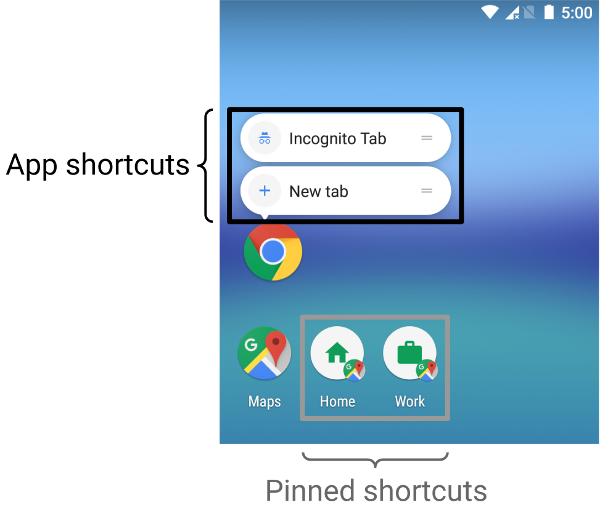
The maximum actions for an app is 5
Static Shortcut
Section titled “Static Shortcut”Can’t be modified after build
In AndroidManifest add meta data inside activity:
<meta-data android:name="android.app.shortcuts" android:resource="@xml/shortcuts" />Add actions in res/xml/
for example res/xml/shortcuts.xml
<?xml version="1.0" encoding="utf-8"?><shortcuts xmlns:android="http://schemas.android.com/apk/res/android"> <shortcut android:icon="@drawable/event" android:shortcutId="events" android:shortcutShortLabel="@string/event" android:shortcutLongLabel="@string/event_long" > <intent android:action="android.intent.action.VIEW" android:targetClass="dev.eliaschen.wsc2022maam.MainActivity" android:targetPackage="dev.eliaschen.wsc2022maam"> <extra android:name="shortcut_id" android:value="events" /> </intent> </shortcut></shortcuts>
android:shortcutShortLabelandandroid:shortcutLongLabel(optional) has to be a string resource
Dynamic Shortcut
Section titled “Dynamic Shortcut”val customIntent = Intent( context, MainActivity::class.java).apply { action = Intent.ACTION_VIEW putExtra("shortcut_id", "events")}
val shortcut = ShortcutInfoCompat.Builder(context, "id1") .setShortLabel("Dynamic Event") .setLongLabel("Open the events") .setIcon( IconCompat.createWithResource( context, R.drawable.bookmark ) ) .setIntent(customIntent) .build()
ShortcutManagerCompat.pushDynamicShortcut(context, shortcut)Handle Action
Section titled “Handle Action”since we put a extra in intent , just check the extra in MainActivity like you normally do
intent.getStringExtra("shortcut_id")Clipboard & Vibration
Section titled “Clipboard & Vibration”Clipboard
Section titled “Clipboard”clipboardManager.setText("Hello, clipboard")Vibrate Feedback
Section titled “Vibrate Feedback”val haptic = LocalHapticFeedback.currenthaptic.performHapticFeedback(HapticFeedbackType.LongPress)Deeplink
Section titled “Deeplink”in Manifest.xml’s activity tag
add following config for link wsapp://edu.ws2022.a2/app/worldskills
<intent-filter>    <action android:name="android.intent.action.VIEW" />    <category android:name="android.intent.category.DEFAULT" />    <category android:name="android.intent.category.BROWSABLE" />
    <data        android:host="edu.ws2022.a2"        android:path="/app/worldskills"        android:scheme="wsapp" /></intent-filter>
Foreground Service (Background Work)
Section titled “Foreground Service (Background Work)”
For MediaPlayback Service, check out the Competition section below.
Glance Widget
Section titled “Glance Widget”Dependencies
Section titled “Dependencies”implementation("androidx.glance:glance-appwidget:1.1.0")implementation("androidx.glance:glance-material3:1.1.0")Create a Receiver
Section titled “Create a Receiver”class MyReceiver : GlanceAppWidgetReceiver() { override val glanceAppWidget: GlanceAppWidget = MyGlanceWidget()}Create widget UI
Section titled “Create widget UI”class MyGlanceWidget : GlanceAppWidget() { @SuppressLint("RestrictedApi") override suspend fun provideGlance(context: Context, id: GlanceId) { provideContent { /* composable function here... */ } }}Add appwidget provider for meta data
Section titled “Add appwidget provider for meta data”Create a xml file under res/xml/:
<?xml version="1.0" encoding="utf-8"?><appwidget-provider xmlns:android="http://schemas.android.com/apk/res/android" android:description="@string/app_name" android:minWidth="200dp" android:minHeight="100dp" android:resizeMode="horizontal|vertical" android:updatePeriodMillis="1000" />In AndroidManifest.xml
Section titled “In AndroidManifest.xml”⚠️ HINT:
android.appwidget.*- the widget is appwidget
<receiver android:name=".MyReceiver" android:exported="true"> <intent-filter> <action android:name="android.appwidget.action.APPWIDGET_UPDATE" /> </intent-filter> <meta-data android:name="android.appwidget.provider" android:resource="@xml/music_widget_info" /></receiver>Auto Update Widget When Rebuild
Section titled “Auto Update Widget When Rebuild”
BarWidgetis aGlanceAppWidget()in this example
Method 1: Via Application Class
Section titled “Method 1: Via Application Class”In Application Class, declare a scope to run suspend action:
private val appScope = CoroutineScope(SupervisorJob() + Dispatchers.Main)Run the update widget method:
appScope.launch { BarWidget().updateAll(applicationContext)}⚠️ Remember to bind the application class in
AndroidManifest.xmland add the widget update method toonCreate()to update the widget when app launches
Method 2: Via MainActivity
Section titled “Method 2: Via MainActivity”Under MainActivity:
suspend fun refreshWidget(context: Context) { BarWidget().updateAll(context)}In Composable:
CoroutineScope(Dispatchers.Main).launch { refreshWidget(this@MainActivity)}Notification
Section titled “Notification”Add permission in AndroidManifest.xml
Section titled “Add permission in AndroidManifest.xml”<uses-permission android:name="android.permission.POST_NOTIFICATIONS" />Create a notification manager
Section titled “Create a notification manager”val notificationManager = context.getSystemService(Context.NOTIFICATION_SERVICE) as NotificationManagerCreate a notification channel
Section titled “Create a notification channel”val channel = NotificationChannel( "channel_id", "channel_name", NotificationManager.IMPORTANCE_HIGH )
notificationManager.createNotificationChannel(channel)Create a notification
Section titled “Create a notification”val notification = NotificationCompat.Builder(context, channelId) .setContentTitle("hello") .setContentText("hello") .setSmallIcon(R.drawable.play) .build()Push the notification
Section titled “Push the notification”notificationManager.notify(<notificationId: Int>, notification)Permission Check/Request
Section titled “Permission Check/Request”
⚠️ Requires Android Studio version above
TIRAMISU:@RequiresApi(Build.VERSION_CODES.TIRAMISU)
Check permission
Section titled “Check permission”Example: Check whether user allows APP to push notification
val hasPermission = ContextCompat.checkSelfPermission( context, Manifest.permission.POST_NOTIFICATIONS) == PackageManager.PERMISSION_GRANTEDCreate a launcher to show the system dialog for requesting permission
Section titled “Create a launcher to show the system dialog for requesting permission”val launcher = rememberLauncherForActivityResult( ActivityResultContracts.RequestPermission()) { Toast.makeText(context, "A permission request has done", Toast.LENGTH_SHORT).show()}Request permission if not granted
Section titled “Request permission if not granted”if (!hasPermission) launcher.launch(Manifest.permission.POST_NOTIFICATIONS)WebView
Section titled “WebView”Dependencies
Section titled “Dependencies”implementation("androidx.webkit:webkit:1.8.0")View for Local HTML File
Section titled “View for Local HTML File”In project explorer under main/assets add a HTML file, then use loadUrl("file:///android_asset/...") to locate it.
NOTE:
file:///android_assetpoints tomain/assets
AndroidView(factory = { WebView(it).apply { layoutParams = ViewGroup.LayoutParams( ViewGroup.LayoutParams.MATCH_PARENT, // for style width and height ViewGroup.LayoutParams.MATCH_PARENT ) }}, update = { it.loadUrl(<file-path or web url>)})View for Web URL
Section titled “View for Web URL”To access the internet, enable the permission in AndroidManifest.xml:
<uses-permission android:name="android.permission.INTERNET" />Utilities
Section titled “Utilities”Calendar
Section titled “Calendar”Calendar is a Java method for converting readable time into a calendar that can be converted to multiple formats.
val calendar = Calendar.getInstance().apply {    timeInMillis = System.currentTimeMillis()
    set(Calendar.HOUR_OF_DAY, 7)    set(Calendar.MINUTE, 0)    set(Calendar.SECOND, 0)
if (timeInMillis <= System.currentTimeMillis()) { add(Calendar.DAY_OF_MONTH, 1) }}SimpleDateFormat
Section titled “SimpleDateFormat”var currentTime by remember { mutableStateOf("") }
LaunchedEffect(Unit) { while (true) { currentTime = SimpleDateFormat("HH:mm", Locale.getDefault()).format(Date()) delay(1000L) }}DateTimeFormatter
Section titled “DateTimeFormatter”LocalDateTime.now().format( DateTimeFormatter.ofPattern( "yyyy-MM-dd HH:mm:ss" ))val formatter = DateTimeFormatter.ofPattern("dd/MM/yyyy HH:mm:ss")val parsed = LocalDateTime.parse("12/04/2026 14:30:00", formatter) // skip formatter if parse source is ISO timeval millis = parsed .atZone(ZoneId.systemDefault()) .toInstant() .toEpochMilli()- Date only
val formatter = DateTimeFormatter.ofPattern("dd/MM/yyyy")val parsed = LocalDate.parse("12/04/2026", formatter)val millis = parsed .atStartOfDay(ZoneId.systemDefault()) .toInstant() .toEpochMilli()Check Format
Section titled “Check Format”Returns a boolean
android.util.Patterns.EMAIL_ADDRESS.matcher(email.value).matches()InputStream & OutputStream
Section titled “InputStream & OutputStream”
InputStream→ Read dataOutputStream→ Write data
Unit Convert
Section titled “Unit Convert”The toDp() method is only available in Local
with(LocalDensity.current) { offsetX.value.toDp()}URI Types
Section titled “URI Types”Content URI (Accessing Content Providers)
Section titled “Content URI (Accessing Content Providers)”content://contacts/people/1(accesses a specific contact with ID 1)content://media/external/audio/media/123(points to an audio file with ID 123 in external storage)content://com.android.calendar/events(accesses calendar events)
File URI (Accessing Files)
Section titled “File URI (Accessing Files)”file:///storage/emulated/0/Download/sample.pdf(points to a PDF file in the Download folder)file:///android_asset/index.html(accesses a file in the app’s assets folder)
Intent URI (Triggering Actions)
Section titled “Intent URI (Triggering Actions)”tel:5551234567(initiates a phone call to the specified number)mailto:user@example.com(opens an email client with the specified address)geo:37.7749,-122.4194(opens a map at the specified coordinates)
Custom URI (App-Specific)
Section titled “Custom URI (App-Specific)”myapp://profile/user123(a custom scheme to open a specific user profile in a custom app)